٧.٣ عُقَد DOM — الجزء الأول
سنستخدم مستند HTML التالي في هذا الدرس:
<!DOCTYPE html>
<html lang="en" dir="ltr">
  <head>
    <meta charset="utf-8">
    <title>Three Magical boxes</title>
    <style>
       #container{
         display: flex;
         justify-content: center;
       }
       .box{
         width: 10rem;
         height: 10rem;
         margin: 1rem;
       }
       #box-1{
         background: lightblue;
       }
       #box-2{
         background: Olive;
       }
       #box-3{
         background: tomato;
       }
    </style>
  </head>
  <body>
    <header>
      <h1>Welcome to 3 three magical boxes website</h1>
    </header>
    <section id="container">
      <div class="box" id="box-1"></div>
      <div class="box" id="box-2"></div>
      <div class="box" id="box-3"></div>
    </section>
    <script src="script.js"></script>
  </body>
</html>
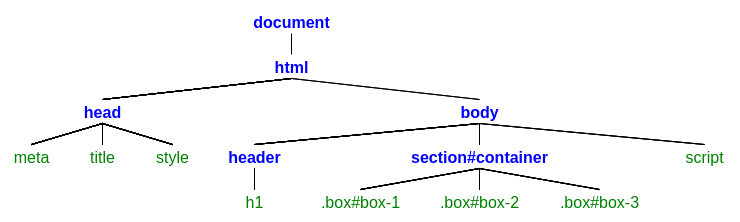
عُقَد DOM
توجد قيم تاريخية مرقّمة لأنواع العُقَد من 1 إلى 12، وبعضها لم يعد مستخدمًا. من الأنواع الشائعة:
| نوع العقدة | القيمة | الوصف |
|---|---|---|
| Node.ELEMENT_NODE | 1 | عقدة عنصر مثل <div> أو <h1> |
| Node.ATTRIBUTE_NODE | 2 | سمة لعنصر. |
| Node.TEXT_NODE | 3 | عقدة تحتوي على نص المستند. |
| Node.COMMENT_NODE | 8 | عقدة تعليق مثل <!-- comment here --> |
عقدة العنصر
التمرين 1: اجلب العنصر الذي يساوي معرّفه container.
let container = document.getElementById("container");

console.log(container);
النتيجة هي: <section id="container">...</section>
التمرين 2: اجلب أول section .
let firstSection = document.getElementsByTagName("section")[0];

console.log(firstSection);
النتيجة هي: <section id="container">...</section>
التمرين 3: اجلب العنصر الذي يساوي معرّفه container باستخدام querySelector.
let container = document.querySelector("#container");

console.log(container);
النتيجة هي: <section id="container">...</section>
التمرين 4: اجلب أول section باستخدام querySelectorAll.
let firstSection = document.querySelectorAll("section")[0];

console.log(firstSection);
النتيجة هي: <section id="container">...</section>
طرق متعددة للوصول إلى عنصر؟
نعم، يمكنك الوصول إلى عناصر HTML بطرق مختلفة. اختر ما يناسب المهمة.
التمرين 5: ارجع إلى التمرين 4؛ ما نتيجة firstSection.nodeName?
let firstSection = document.querySelectorAll("section")[0];

console.log(firstSection.nodeName);
النتيجة هي: SECTION
nodeName
العامل nodeName تُرجع اسم العقدة.
التمرين 6: ارجع إلى التمرين 4؛ ما نتيجة firstSection.nodeType?
let firstSection = document.querySelectorAll("section")[0];

console.log(firstSection.nodeType);
النتيجة هي: 1
nodeType
العامل nodeType تُرجع عددًا يحدّد نوع العقدة.
التمرين 7: اجلب جميع عناصر الصناديق بالطريقة التي تفضّلها.
let boxes = document.getElementsByClassName("box");

console.log(boxes);
النتيجة هي: HTMLCollection(3) [div#box-1.box, div#box-2.box, div#box-3.box...]
التمرين 8: اجلب أول عنصر ابن لـ container.
let container = document.getElementById("container");
let fstChildEl = container.children[0];

console.log(fstChildEl);
النتيجة هي: <div id="box-1" class="box"></div>
التمرين 9: اجلب أول عنصر ابن لـ container باستخدام firstElementChild.
let container = document.getElementById("container");
let fstChildEl = container.firstElementChild;

console.log(fstChildEl);
النتيجة هي: <div id="box-1" class="box"></div>
firstElementChild
العامل firstElementChild تُرجع أول عقدة عنصر ضمن الأبناء.
التمرين 10: ارجع إلى التمرين 9؛ ما اسم عقدة fstChildEl ؟
let container = document.getElementById("container");
let fstChildEl = container.firstElementChild;

console.log(fstChildEl.nodeName);
النتيجة هي: DIV
التمرين 11: ارجع إلى التمرين 9؛ ما نوع عقدة fstChildEl ؟
let container = document.getElementById("container");
let fstChildEl = container.firstElementChild;

console.log(fstChildEl.nodeType);
النتيجة هي: 1
التمرين 12: اجلب آخر عنصر ابن لـ container.
let container = document.getElementById("container");
let lstChildEl = container.children[2];

console.log(lstChildEl);
النتيجة هي: <div id="box-3" class="box"></div>
التمرين 13: اجلب آخر عنصر ابن لـ container باستخدام lastElementChild.
let container = document.getElementById("container");
let lstChildEl = container.lastElementChild;

console.log(lstChildEl);
النتيجة هي: <div id="box-3" class="box"></div>
lastElementChild
العامل lastElementChild تُرجع آخر عقدة عنصر ضمن الأبناء.
التمرين 14: ارجع إلى التمرين 13؛ ما اسم عقدة lstChildEl ؟
let container = document.getElementById("container");
let lstChildEl = container.lastElementChild;

console.log(lstChildEl.nodeName);
النتيجة هي: DIV
التمرين 15: ارجع إلى التمرين 13؛ ما نوع عقدة lstChildEl ؟
let container = document.getElementById("container");
let lstChildEl = container.lastElementChild;

console.log(lstChildEl.nodeType);
النتيجة هي: 1
التمرين 16: اجلب ثاني عنصر ابن لـ container.
let container = document.getElementById("container");
let secondChild = container.children[1];

console.log(secondChild);
النتيجة هي: <div id="box-2" class="box"></div>
التمرين 17: ارجع إلى التمرين 16؛ اجلب العنصر الشقيق السابق لـ secondChild باستخدام previousElementSibling.
let container = document.getElementById("container");
let secondChild = container.children[1];
let previousSibling = secondChild.previousElementSibling;

console.log(previousSibling);
النتيجة هي: <div id="box-1" class="box"></div>
previousElementSibling
العامل previousElementSibling تُرجع العنصر الشقيق السابق للعنصر المحدّد.
التمرين 18: ارجع إلى التمرين 17؛ ما اسم عقدة previousSibling ؟
let container = document.getElementById("container");
let secondChild = container.children[1];
let previousSibling = secondChild.previousElementSibling;

console.log(previousSibling.nodeName);
النتيجة هي: DIV
التمرين 19: ارجع إلى التمرين 17؛ ما نوع عقدة previousSibling ؟
let container = document.getElementById("container");
let secondChild = container.children[1];
let previousSibling = secondChild.previousElementSibling;

console.log(previousSibling.nodeType);
النتيجة هي: 1
التمرين 20: ارجع إلى التمرين 16؛ اجلب العنصر الشقيق التالي لـ secondChild باستخدام nextElementSibling.
let container = document.getElementById("container");
let secondChild = container.children[1];
let nextSibling = secondChild.nextElementSibling;

console.log(nextSibling);
النتيجة هي: <div id="box-3" class="box"></div>
nextElementSibling
العامل nextElementSibling تُرجع العنصر الشقيق التالي للعنصر المحدّد.
التمرين 21: ارجع إلى التمرين 20؛ ما اسم عقدة nextSibling ؟
let container = document.getElementById("container");
let secondChild = container.children[1];
let nextSibling = secondChild.nextElementSibling;

console.log(nextSibling.nodeName);
النتيجة هي: DIV
التمرين 22: ارجع إلى التمرين 20؛ ما نوع عقدة nextSibling ؟
let container = document.getElementById("container");
let secondChild = container.children[1];
let nextSibling = secondChild.nextElementSibling;

console.log(nextSibling.nodeType);
النتيجة هي: 1
عقدة السمة
hasAttribute()
التمرين 23: اجلب الصندوق الثالث.
let box3 = document.getElementById("box-3");

console.log(box3);
النتيجة هي: <div id="box-3" class="box"></div>
التمرين 24: ارجع إلى التمرين 23؛ هل box3 يمتلك السمة class ؟ تلميح: استخدم element.hasAttribute("class").
let box3 = document.getElementById("box-3");
let hasClass = box3.hasAttribute("class");

console.log(hasClass);
النتيجة هي: true
element.hasAttribute()
العامل element.hasAttribute() تُرجع true أو false بحسب وجود السمة المحدّدة.
التمرين 25: ارجع إلى التمرين 23؛ هل box3 يمتلك السمة id ؟ تلميح: استخدم element.hasAttribute("id").
let box3 = document.getElementById("box-3");
let hasId = box3.hasAttribute("id");

console.log(hasId);
النتيجة هي: true
التمرين 26: ارجع إلى التمرين 23؛ هل box3 يمتلك السمة title ؟ تلميح: استخدم element.hasAttribute("title").
let box3 = document.getElementById("box-3");
let hasTitle = box3.hasAttribute("title");

console.log(hasTitle);
النتيجة هي: false
getAttribute()
التمرين 27: اجلب #box-1 داخل #container .
let box1 = document.querySelector("#container #box-1");

console.log(box1);
النتيجة هي: <div id="box-1" class="box"></div>
التمرين 28: ارجع إلى التمرين 27؛ هل box1 يمتلك السمة class ؟
let box1 = document.querySelector("#container #box-1");
let hasClass = box1.hasAttribute("class");

console.log(hasClass);
النتيجة هي: true
التمرين 29: ارجع إلى التمرين 27؛ ما قيمة السمة class ؟ تلميح: استخدم getAttribute("class").
let box1 = document.querySelector("#container #box-1");
let classValue = box1.getAttribute("class");

console.log(classValue);
النتيجة هي: box
element.getAttribute()
العامل element.getAttribute() تُرجع قيمة السمة المحدّدة في العنصر.
إذا لم تكن السمة موجودة، فإن element.getAttribute() تُرجع null . أما السلسلة الفارغة فقد تكون قيمة سمة موجودة بلا محتوى. "".
التمرين 30: ارجع إلى التمرين 27؛ هل box1 يمتلك السمة id ؟
let box1 = document.querySelector("#container #box-1");
let hasId = box1.hasAttribute("id");

console.log(hasId);
النتيجة هي: true
التمرين 31: ارجع إلى التمرين 27؛ ما قيمة السمة id ؟
let box1 = document.querySelector("#container #box-1");
let idValue = box1.getAttribute("id");

console.log(idValue);
النتيجة هي: box-1
التمرين 32: ارجع إلى التمرين 27؛ هل box1 يمتلك السمة alt ؟
let box1 = document.querySelector("#container #box-1");
let hasAlt = box1.hasAttribute("alt");

console.log(hasAlt);
النتيجة هي: false
التمرين 33: ارجع إلى التمرين 27؛ ما قيمة السمة alt ؟
let box1 = document.querySelector("#container #box-1");
let altValue = box1.getAttribute("alt");

console.log(altValue);
النتيجة هي: null
setAttribute()
التمرين 34: اجلب h1 داخل header . هل h1 يمتلك السمة id ؟
let h1 = document.querySelector("header > h1");
let hasId = h1.hasAttribute("id");

console.log(hasId);
النتيجة هي: false
التمرين 35: ارجع إلى التمرين 34؛ اضبط قيمة id سمةً بالقيمة #heading1. تلميح: استخدم element.setAttribute("id", "heading1").
let h1 = document.querySelector("header > h1");
h1.setAttribute("id", "heading1");

console.log(h1);
console.log(h1.getAttribute("id"));
النتيجة كما يلي:
<h1 id="heading1">Welcome to 3 three magical boxes website</h1>
heading1
element.setAttribute()
العامل element.setAttribute(attr, attrValue) تضبط السمة المحدّدة على القيمة المُعطاة.
التمرين 36: اضبط سمة class للعنصر #box-2 على "box black awesome".
let box2 = document.querySelector("#container > #box-2");
box2.setAttribute("class", "box black awesome");

console.log(box2);
console.log(box2.getAttribute("class"));
النتيجة كما يلي:
<div class="box black awesome" id="box-2"></div>
box black awesome
removeAttribute()
التمرين 37: احذف class من #box-3. تلميح: استخدم element.removeAttribute("class").
let box3 = document.querySelector("#container > #box-3");
box3.removeAttribute("class");

console.log(box3);
النتيجة هي: <div id="box-3"></div>
element.removeAttribute()
العامل element.removeAttribute(attr) تحذف السمة المحدّدة من العنصر.
التمرين 38: احذف id من عنصر الحاوية.
let container = document.querySelector("#container");
container.removeAttribute("id");

console.log(container.getAttribute("id"));
النتيجة هي: null
التمرين 39: احذف class من جميع الصناديق.
let boxes = document.querySelectorAll("#container > .box");
for(let box of Array.from(boxes)){
  box.removeAttribute("class");
}

console.log(boxes);
النتيجة هي: NodeList(3) [div#box-1, div#box-2, div#box-3]
التمرين 40: احذف id من جميع الصناديق.
let boxes = document.querySelectorAll("#container > .box");
for(let box of Array.from(boxes)){
  box.removeAttribute("id");
}

console.log(boxes);
النتيجة هي: NodeList(3) [div.box, div.box, div.box]