٧.٥ إنشاء العناصر
سنستخدم مستند HTML التالي في هذا الدرس:
<!DOCTYPE html>
<html lang="en">

  <head>
    <meta charset="UTF-8" />
    <title>Creating Elements</title>
  </head>

  <body>
    <script src="script.js"></script>
  </body>

</html>
تدريب ١
في التمارين 1–10؛ سنُنشئ شجرة DOM التالية.
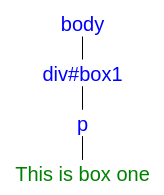
التمرين 1: أنشئ div باستخدام document.createElement("div").
let div = document.createElement("div");

console.log(div);
النتيجة هي: <div></div>
document.createElement(tagName)
العامل document.createElement(tagName) تُنشئ عنصر HTML باسم الوسم المحدّد في tagName.
التمرين 2: ارجع إلى التمرين 1؛ أضف id=box1 على div .
let div = document.createElement("div");
div.setAttribute("id", "box1");

console.log(div);
النتيجة هي: <div id="box1"></div>
التمرين 3: اختر body من المستند.
let body = document.querySelector("body");

console.log(body);
النتيجة هي: <body>...</body>
التمرين 4: ارجع إلى التمرينان 2 و3؛ أضف div إلى body في المستند. تلميح: استخدم body.appendChild("divElement").
let div = document.createElement("div");
div.setAttribute("id", "box1");

let body = document.querySelector("body");

body.appendChild(div);

console.log(body);
النتيجة كما يلي:
<body>
  <script src="script.js"></script>
  <div id="box1"></div>
</body>
element.appendChild(child)
العامل element.appendChild(child) تُلحق عقدة child بنهاية أبناء العقدة الأب المحدّدة.
التمرين 5: ارجع إلى التمرين 4؛ أنشئ p .
let div = document.createElement("div");
div.setAttribute("id", "box1");

let body = document.querySelector("body");
body.appendChild(div);

let p = document.createElement("p");

console.log(p);
النتيجة هي: <p></p>
التمرين 6: ارجع إلى التمرين 5؛ أنشئ عقدة نصية. تلميح: استخدم document.createTextNode("This is box one").
let div = document.createElement("div");
div.setAttribute("id", "box1");

let body = document.querySelector("body");
body.appendChild(div);

let p = document.createElement("p");

let text = document.createTextNode("This is box one");

console.log(text);
النتيجة هي: "This is box one"
document.createTextNode(text)
العامل document.createTextNode(text) تُنشئ عقدة نصية بالنص المُعطى.
التمرين 7: ارجع إلى التمرين 6؛ ما اسم العقدة ونوعها لـ text?
let div = document.createElement("div");
div.setAttribute("id", "box1");

let body = document.querySelector("body");
body.appendChild(div);

let p = document.createElement("p");

let text = document.createTextNode("This is box one");

console.log(text.nodeName);
console.log(text.nodeType);
النتيجة كما يلي:
#text
3
التمرين 8: ارجع إلى التمرين 6؛ أضف وحدة text عقدةً إلى p .
let div = document.createElement("div");
div.setAttribute("id", "box1");

let body = document.querySelector("body");
body.appendChild(div);

let p = document.createElement("p");

let text = document.createTextNode("This is box one");
p.appendChild(text);

console.log(p);
النتيجة هي: <p>This is box one</p>
التمرين 9: ارجع إلى التمرين 7؛ أضف وحدة p إلى div .
let div = document.createElement("div");
div.setAttribute("id", "box1");

let body = document.querySelector("body");
body.appendChild(div);

let p = document.createElement("p");

let text = document.createTextNode("This is box one");
p.appendChild(text);

div.appendChild(p);

console.log(body);
النتيجة كما يلي:
<body>
  <script src="script.js"></script>
  <div id="box1">
    <p>This is box one</p>
  </div>
</body>
التمرين 10: ارجع إلى التمرين 9؛ أدرج div قبل script داخل body. تلميح: استخدم body.insertBefore(div, script).
let div = document.createElement("div");
div.setAttribute("id", "box1");

let body = document.querySelector("body");
let script = document.querySelector("script");
body.insertBefore(div, script);

let p = document.createElement("p");

let text = document.createTextNode("This is box one");
p.appendChild(text);

div.appendChild(p);

console.log(body);
النتيجة كما يلي:
<body>
  <div id="box1">
    <p>This is box one</p>
  </div>
  <script src="script.js"></script>
</body>
parent.insertBefore(newElement, referenceElement)
العامل parent.insertBefore(newElement, referenceElement) تُدرج newELement قبل referenceElement ضمن الأب المحدّد.
تدريب ٢
في التمارين 11–16؛ سنُنشئ شجرة DOM التالية.
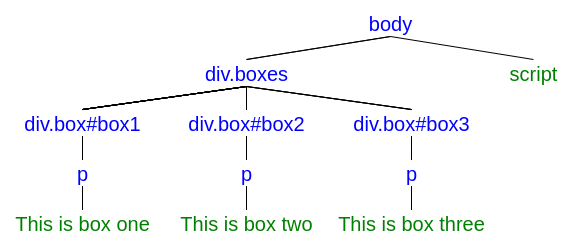
التمرين 11: أنشئ div.boxes وأدرجه قبل script .
// Selecting Elements
let body = document.querySelector("body");
let script = document.querySelector("script");

// Creating Elements
let boxes = document.createElement("div");
boxes.setAttribute("class", "boxes");

// Adding Elements to the DOM tree
body.insertBefore(boxes, script);

console.log(body);
النتيجة كما يلي:
<body>
  <div class="boxes"></div>
  <script src="script.js"></script>
</body>
التمرين 12: أنشئ #box1 وألحقه بـ .boxes .
// Selecting Elements
let body = document.querySelector("body");
let script = document.querySelector("script");

// Creating Elements
let boxes = document.createElement("div");
boxes.setAttribute("class", "boxes");
let box1 = document.createElement("div");
box1.setAttribute("class", "box");
box1.setAttribute("id", "box1");

// Adding Elements to the DOM tree
body.insertBefore(boxes, script);
boxes.appendChild(box1);

console.log(body);
النتيجة كما يلي:
<body>
  <div class="boxes">
    <div class="box" id="box1"></div>
  </div>
  <script src="script.js"></script>
</body>
التمرين 13: أنشئ p وألحقه بـ box1 .
// Selecting Elements
let body = document.querySelector("body");
let script = document.querySelector("script");

// Creating Elements
let boxes = document.createElement("div");
boxes.setAttribute("class", "boxes");
let box1 = document.createElement("div");
box1.setAttribute("class", "box");
box1.setAttribute("id", "box1");
let box1P = document.createElement("p");

// Adding Elements to the DOM tree
body.insertBefore(boxes, script);
boxes.appendChild(box1);
box1.appendChild(box1P);

console.log(body);
النتيجة كما يلي:
<body>
  <div class="boxes">
    <div class="box" id="box1">
      <p></p>
    </div>
  </div>
  <script src="script.js"></script>
</body>
التمرين 14: أنشئ This is box one عقدةً نصية وألحقها بـ box1 > p .
// Selecting Elements
let body = document.querySelector("body");
let script = document.querySelector("script");

// Creating Elements
let boxes = document.createElement("div");
boxes.setAttribute("class", "boxes");
let box1 = document.createElement("div");
box1.setAttribute("class", "box");
box1.setAttribute("id", "box1");
let box1P = document.createElement("p");
let text1 = document.createTextNode("This is box one");

// Adding Elements to the DOM tree
body.insertBefore(boxes, script);
boxes.appendChild(box1);
box1.appendChild(box1P);
box1P.appendChild(text1);

console.log(body);
النتيجة كما يلي:
<body>
  <div class="boxes">
    <div class="box" id="box1">
      <p>This is box one</p>
    </div>
  </div>
  <script src="script.js"></script>
</body>
التمرين 15: كرّر التمارين 12–14 لـ box2 .
// Selecting Elements
let body = document.querySelector("body");
let script = document.querySelector("script");

// Creating Elements
let boxes = document.createElement("div");
boxes.setAttribute("class", "boxes");
//box1
let box1 = document.createElement("div");
box1.setAttribute("class", "box");
box1.setAttribute("id", "box1");
let box1P = document.createElement("p");
let text1 = document.createTextNode("This is box one");
//box2
let box2 = document.createElement("div");
box2.setAttribute("class", "box");
box2.setAttribute("id", "box2");
let box2P = document.createElement("p");
let text2 = document.createTextNode("This is box two");

// Adding Elements to the DOM tree
body.insertBefore(boxes, script);
//box1
boxes.appendChild(box1);
box1.appendChild(box1P);
box1P.appendChild(text1);
//box2
boxes.appendChild(box2);
box2.appendChild(box2P);
box2P.appendChild(text2);

console.log(body);
النتيجة كما يلي:
<body>
  <div class="boxes">
    <div class="box" id="box1">
      <p>This is box one</p>
    </div>
    <div class="box" id="box2">
      <p>This is box two</p>
    </div>
  </div>
  <script src="script.js"></script>
</body>
التمرين 16: كرّر التمارين 12–14 لـ box3 .
// Selecting Elements
let body = document.querySelector("body");
let script = document.querySelector("script");

// Creating Elements
let boxes = document.createElement("div");
boxes.setAttribute("class", "boxes");
//box1
let box1 = document.createElement("div");
box1.setAttribute("class", "box");
box1.setAttribute("id", "box1");
let box1P = document.createElement("p");
let text1 = document.createTextNode("This is box one");
//box2
let box2 = document.createElement("div");
box2.setAttribute("class", "box");
box2.setAttribute("id", "box2");
let box2P = document.createElement("p");
let text2 = document.createTextNode("This is box two");
//box3
let box3 = document.createElement("div");
box3.setAttribute("class", "box");
box3.setAttribute("id", "box3");
let box3P = document.createElement("p");
let text3 = document.createTextNode("This is box three");

// Adding Elements to the DOM tree
body.insertBefore(boxes, script);
//box1
boxes.appendChild(box1);
box1.appendChild(box1P);
box1P.appendChild(text1);
//box2
boxes.appendChild(box2);
box2.appendChild(box2P);
box2P.appendChild(text2);
//box3
boxes.appendChild(box3);
box3.appendChild(box3P);
box3P.appendChild(text3);

console.log(body);
النتيجة كما يلي:
<body>
  <div class="boxes">
    <div class="box" id="box1">
      <p>This is box one</p>
    </div>
    <div class="box" id="box2">
      <p>This is box two</p>
    </div>
    <div class="box" id="box3">
      <p>This is box three</p>
    </div>
  </div>
  <script src="script.js"></script>
</body>
تدريب ٣
في التمارين 17–22؛ سنُنشئ شجرة DOM التالية.
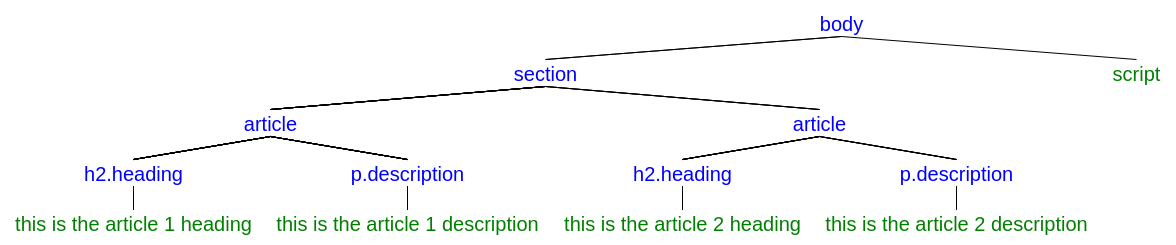
التمرين 17: أنشئ section عنصرًا، وأضفه إلى body .
// Selecting Elements
let body = document.querySelector("body");
let script = document.querySelector("script");

// Creating Elements
let section = document.createElement("section");

// Adding Elements to the DOM tree
body.insertBefore(section, script);

console.log(body);
النتيجة كما يلي:
<body>
  <section></section>
  <script src="script.js"></script>
</body>
التمرين 18: أنشئ article عناصرَ، وأضفها إلى section .
// Selecting Elements
let body = document.querySelector("body");
let script = document.querySelector("script");

// Creating Elements
let section = document.createElement("section");
let article1 = document.createElement("article");
let article2 = document.createElement("article");

// Adding Elements to the DOM tree
body.insertBefore(section, script);
section.appendChild(article1);
section.appendChild(article2);

console.log(body);
النتيجة كما يلي:
<body>
  <section>
    <article></article>
    <article></article>
  </section>
  <script src="script.js"></script>
</body>
التمرين 19: أنشئ h2.heading عناصرَ، وأضف كلًا منها إلى article .
// Selecting Elements
let body = document.querySelector("body");
let script = document.querySelector("script");

// Creating Elements
let section = document.createElement("section");
let article1 = document.createElement("article");
let article2 = document.createElement("article");
let article1Heading = document.createElement("h2");
article1Heading.setAttribute("class", "heading");
let article2Heading = document.createElement("h2");
article2Heading.setAttribute("class", "heading");


// Adding Elements to the DOM tree
body.insertBefore(section, script);
section.appendChild(article1);
section.appendChild(article2);
article1.appendChild(article1Heading);
article2.appendChild(article2Heading);

console.log(body);
النتيجة كما يلي:
<body>
  <section>
    <article>
      <h2 class="heading"></h2>
    </article>
    <article>
      <h2 class="heading"></h2>
    </article>
  </section>
  <script src="script.js"></script>
</body>
التمرين 20: أضف العقدة النصية "this is the article [1/2] heading" إلى العنصر المقابل article .
// Selecting Elements
let body = document.querySelector("body");
let script = document.querySelector("script");

// Creating Elements
let section = document.createElement("section");
let article1 = document.createElement("article");
let article2 = document.createElement("article");
let article1Heading = document.createElement("h2");
article1Heading.setAttribute("class", "heading");
let article2Heading = document.createElement("h2");
article2Heading.setAttribute("class", "heading");
let headingText1 = document.createTextNode("this is the article 1 heading");
let headingText2 = document.createTextNode("this is the article 2 heading");

// Adding Elements to the DOM tree
body.insertBefore(section, script);
section.appendChild(article1);
section.appendChild(article2);
article1.appendChild(article1Heading);
article2.appendChild(article2Heading);
article1Heading.appendChild(headingText1);
article2Heading.appendChild(headingText2);

console.log(body);
النتيجة كما يلي:
<body>
  <section>
    <article>
      <h2 class="heading">this is the article 1 heading</h2>
    </article>
    <article>
      <h2 class="heading">this is the article 2 heading</h2>
    </article>
  </section>
  <script src="script.js"></script>
</body>
التمرين 21: أنشئ p عناصرَ، وأضف كلًا منها إلى article .
// Selecting Elements
let body = document.querySelector("body");
let script = document.querySelector("script");

// Creating Elements
let section = document.createElement("section");
let article1 = document.createElement("article");
let article2 = document.createElement("article");
let article1Heading = document.createElement("h2");
article1Heading.setAttribute("class", "heading");
let article2Heading = document.createElement("h2");
article2Heading.setAttribute("class", "heading");
let headingText1 = document.createTextNode("this is the article 1 heading");
let headingText2 = document.createTextNode("this is the article 2 heading");
let article1P = document.createElement("p");
article1P.setAttribute("class", "description");
let article2P = document.createElement("p");
article2P.setAttribute("class", "description");

// Adding Elements to the DOM tree
body.insertBefore(section, script);
section.appendChild(article1);
section.appendChild(article2);
article1.appendChild(article1Heading);
article2.appendChild(article2Heading);
article1Heading.appendChild(headingText1);
article2Heading.appendChild(headingText2);
article1.appendChild(article1P);
article2.appendChild(article2P);

console.log(body);
النتيجة كما يلي:
<body>
  <section>
    <article>
      <h2 class="heading">this is the article 1 heading</h2>
      <p class="description"></p>
    </article>
    <article>
      <h2 class="heading">this is the article 2 heading</h2>
      <p class="description"></p>
    </article>
  </section>
  <script src="script.js"></script>
</body>
التمرين 22: أضف العقدة النصية "this is the article [1/2] description" إلى العنصر المقابل article .
// Selecting Elements
let body = document.querySelector("body");
let script = document.querySelector("script");

// Creating Elements
let section = document.createElement("section");
let article1 = document.createElement("article");
let article2 = document.createElement("article");
let article1Heading = document.createElement("h2");
article1Heading.setAttribute("class", "heading");
let article2Heading = document.createElement("h2");
article2Heading.setAttribute("class", "heading");
let headingText1 = document.createTextNode("this is the article 1 heading");
let headingText2 = document.createTextNode("this is the article 2 heading");
let article1P = document.createElement("p");
article1P.setAttribute("class", "description");
let article2P = document.createElement("p");
article2P.setAttribute("class", "description");
let description1 = document.createTextNode("this is the article 1 description");
let description2 = document.createTextNode("this is the article 2 description");

// Adding Elements to the DOM tree
body.insertBefore(section, script);
section.appendChild(article1);
section.appendChild(article2);
article1.appendChild(article1Heading);
article2.appendChild(article2Heading);
article1Heading.appendChild(headingText1);
article2Heading.appendChild(headingText2);
article1.appendChild(article1P);
article2.appendChild(article2P);
article1P.appendChild(description1);
article2P.appendChild(description2);

console.log(body);
النتيجة كما يلي:
<body>
  <section>
    <article>
      <h2 class="heading">this is the article 1 heading</h2>
      <p class="description">this is the article 1 description</p>
    </article>
    <article>
      <h2 class="heading">this is the article 2 heading</h2>
      <p class="description">this is the article 1 description </p>
    </article>
  </section>
  <script src="script.js"></script>
</body>