٧.٦ تنسيق العناصر
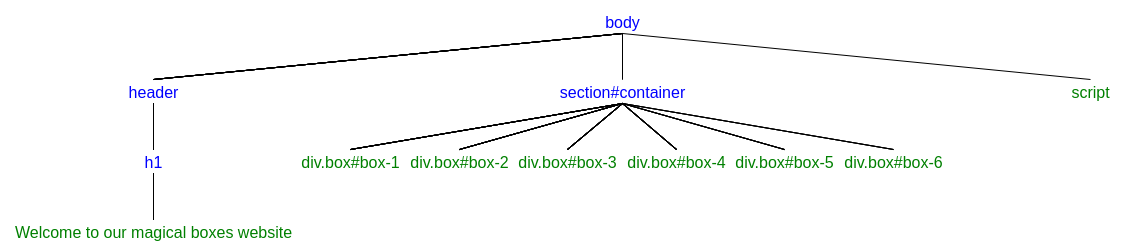
سنستخدم مستند HTML التالي في هذا الدرس:
<!DOCTYPE html>
<html lang="en" dir="ltr">
  <head>
    <meta charset="utf-8">
    <title>The magical boxes</title>
    <style>
       #container{
         display: flex;
         justify-content: center;
       }
       .box{
         width: 10rem;
         height: 10rem;
         margin: 1rem;
       }
       #box-1{
         background: lightblue;
       }
       #box-2{
         background: Olive;
       }
       #box-3{
         background: tomato;
       }
       #box-4{
         background: DarkSlateGray;
       }
       #box-5{
         background: SaddleBrown;
       }
       #box-6{
         background: Yellow;
       }
       .border-bold{
         border: 0.8rem solid #000;
       }
       .border-light{
         border: 0.1rem solid #000;
       }
       .hide{
         display: none;
       }
    </style>
  </head>
  <body>
    <header>
      <h1>Welcome to our magical boxes website</h1>
    </header>
    <section id="container">
      <div class="box" id="box-1"></div>
      <div class="box" id="box-2"></div>
      <div class="box" id="box-3"></div>
      <div class="box" id="box-4"></div>
      <div class="box" id="box-5"></div>
      <div class="box" id="box-6"></div>
    </section>
    <script src="script.js"></script>
  </body>
</html>
الخاصية style
الكائن style
العامل style يمثّل تصريحات التنسيق المضمّنة في العنصر.
التمرين 1: غيّر لون خلفية الصندوق الأول إلى green. تلميح: استخدم el.style.backgroundColor = "green".
let el = document.querySelector("#container > .box:first-child");

el.style.backgroundColor = "green";
التمرين 2: غيّر لون خلفية الصناديق ذات الأرقام الزوجية إلى red.
let els = document.querySelectorAll("#container > .box:nth-child(even)");

for(let el of els){
  el.style.backgroundColor = "red";
}
التمرين 3: غيّر عرض الصندوق الثالث إلى 30rem. تلميح: استخدم el.style.width = "30rem".
let el = document.querySelector("#container > .box:nth-child(3)");

el.style.width = "30rem";
التمرين 4: غيّر ارتفاع الصندوق الرابع إلى 20rem. تلميح: استخدم el.style.height="20rem".
let el = document.querySelector("#container > .box:nth-child(4)");

el.style.height = "20rem";
التمرين 5: غيّر حدود جميع الصناديق إلى 0.2rem solid #000. تلميح: استخدم el.style.border = "0.2rem solid #000".
let els = document.querySelectorAll("#container > .box");

for(let el of els){
  el.style.border = "0.2rem solid #000";
}
التمرين 6: أضف النص I am in box 5 إلى الصندوق الخامس، وغيّر لون الخط إلى white. تلميح: استخدم el.style.color = "#fff".
let el = document.querySelector("#container > .box:nth-child(5)");
let text = document.createTextNode("I am in box 5");
el.appendChild(text);

el.style.color = "#fff";
التمرين 7: ارجع إلى التمرين 6؛ اجعل الخط 2rem. تلميح: استخدم el.style.fontSize = "2rem".
let el = document.querySelector("#container > .box:nth-child(5)");
let text = document.createTextNode("I am in box 5");
el.appendChild(text);

el.style.color = "#fff";
el.style.fontSize = "2rem";
التمرين 8: ارجع إلى التمرين 7؛ أضف حشوة داخلية إلى el. تلميح: استخدم el.style.padding = "4rem"
let el = document.querySelector("#container > .box:nth-child(5)");
let text = document.createTextNode("I am in box 5");
el.appendChild(text);

el.style.color = "#fff";
el.style.fontSize = "2rem";
el.style.padding = "4rem";
التمرين 9: غيّر margin لجميع الصناديق إلى 0.1rem 0.2rem.
let els = document.querySelectorAll("#container > .box");

for(let el of els){
  el.style.margin = "0.1rem 0.2rem";
}
راجع قائمة الخصائص التي يمكن استخدامها مع style على موقع W3schools.com .
التمرين 10: طبّق تنسيقًا على جميع الصناديق باستخدام el.style.cssText = ""
let els = document.querySelectorAll("#container > .box");

for(let el of els){
  el.style.cssText = "border: 2rem dotted red; background-color: olive; margin-left: 0.1rem";
}
باستخدام cssText للتنسيق يستبدل جميع تصريحات CSS المضمّنة الموجودة على العنصر.
التمرين 11: غيّر background-color لـ header على tomato، و color على white. استخدم cssText.
let el = document.querySelector("header");

el.style.cssText = "background-color: tomato; color: white;";
التمرين 12: ارجع إلى التمرين 11؛ أضف padding: 2rem على header.
let el = document.querySelector("header");

el.style.cssText = "background-color: tomato; color: white; padding: 2rem";
التمرين 13: ارجع إلى التمرين 12؛ أضف margin: 2rem 0 على header.
let el = document.querySelector("header");

el.style.cssText = "background-color: tomato; color: white; padding: 2rem; margin: 2rem 0";
التمرين 14: ارجع إلى التمرين 13؛ وسّط النص داخل header .
let el = document.querySelector("header");

el.style.cssText = "background-color: tomato; color: white; padding: 2rem; margin: 2rem 0; text-align: center";
className
التمرين 15: ما أصناف CSS المطبّقة على الصندوق الأول؟ تلميح: استخدم el.className
let el = document.getElementsByClassName("box")[0];

console.log(el.className);
النتيجة هي: box
التمرين 16: ارجع إلى التمرين 15؛ أضف وحدة border-bold صنفًا إلى el. تلميح: استخدم el.className="border-bold".
let el = document.getElementsByClassName("box")[0];

el.className = "border-bold";
console.log(el.className);
النتيجة هي: border-bold
التمرين 17: ارجع إلى التمرين 16؛ أضف وحدة border-bold صنفًا إلى el. تلميح: استخدم el.className+="border-bold".
let el = document.getElementsByClassName("box")[0];

el.className += " border-bold";
console.log(el.className);
النتيجة هي: box border-bold
التمرين 18: أضف border-light صنفًا إلى الصندوق الثاني.
let el = document.getElementsByClassName("box")[1];

el.className += " border-light";
console.log(el.className);
النتيجة هي: box border-light
el.className
العامل el.className تقرأ قيمة السمة class للعنصر أو تضبطها.
classList
التمرين 19: اعرض أصناف الصندوق الأخير. تلميح: استخدم el.classList.
let el = document.getElementsByClassName("box")[5];

console.log(el.classList);
النتيجة هي: DOMTokenList ["box", value: "box"]
التمرين 20: ارجع إلى التمرين 19؛ أضف وحدة .hide صنفًا إلى el. تلميح: استخدم el.classList.add("hide").
let el = document.getElementsByClassName("box")[5];
el.classList.add("hide");
console.log(el.classList);
النتيجة هي: DOMTokenList(2) ["box", "hide", value: "box hide"]
التمرين 21: ارجع إلى التمرين 20؛ احذف hide صنفًا من el. تلميح: استخدم el.classList.remove("hide").
let el = document.getElementsByClassName("box")[5];
el.classList.add("hide");
el.classList.remove("hide");
console.log(el.classList);
النتيجة هي: DOMTokenList ["box", value: "box"]
التمرين 22: أضف مصفوفة border-bold صنفًا إلى الصندوق الأول باستخدام classList.
let el = document.querySelector("#container > .box:first-child");

el.classList.add("border-bold");
التمرين 23: أضف مصفوفة border-light صنفًا إلى الصندوق الثالث باستخدام classList.
let el = document.querySelector("#container > .box:nth-child(3)");

el.classList.add("border-light");
التمرين 24: احذف box صنفًا من الصندوق الرابع، وأضف border-light إليه باستخدام classList.
let el = document.querySelector("#container > .box:nth-child(4)");

el.classList.remove("box");
el.classList.add("border-light");